How to View and Download Your Personal Loan Statement Anytime
A personal loan statement provides a clear summary of your EMIs, interest rate, outstanding balance and repayment history. You can view or download your loan statement online through net banking, the lender’s mobile app or by email. Offline options include visiting a branch or contacting customer care to receive a printed or digital copy.
Financial institutions offer multiple ways to access your personal loan statement, so you can choose the method that’s most convenient. Below are the common online and offline methods to obtain and read your loan statement, along with guidance on what to look for.
What is a Personal Loan Statement?
A personal loan statement is a concise summary of your loan account. It presents essential information about your loan in one place, including your EMIs, outstanding balance, interest rate type and repayment progress. The statement helps you track how much you have repaid, what remains outstanding and any charges applied. It is the simplest way to review your loan status at a glance.
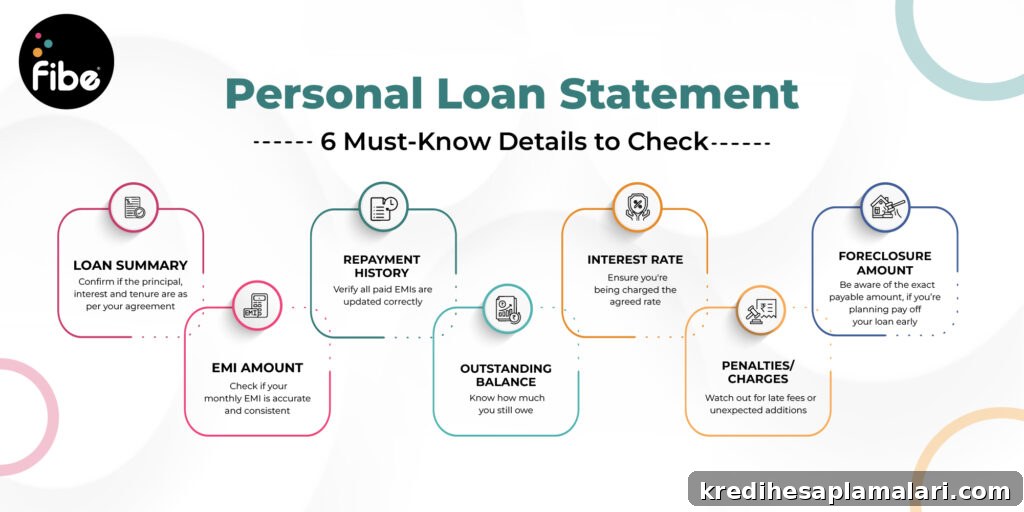
Key Details You Will Find in Your Personal Loan Statement
Your personal loan statement gives a transparent overview of your loan account. Typical entries include:
- Loan ID: A unique identifier for your loan used for online access or when speaking with customer care.
- Account number: The bank account linked to your EMI payments; often required for net banking access and EMI tracking.
- Statement number: A reference ID for monthly or quarterly statements.
- Interest rate type: Indicates whether the loan carries a fixed or floating interest rate. Fixed rates remain constant during the tenure, while floating rates can change at reset cycles and may affect EMI or interest payments.
- Loan summary: A snapshot of the sanctioned amount, EMI, tenure and repayment progress.
- Repayment history: Details of EMIs paid to date and any missed or delayed payments.
- Outstanding balance: The remaining principal amount you still need to repay.
- EMI amount: Your monthly instalment that includes both interest and principal portions.
- Adjustments: Any additional charges, refunds, reversals or corrections applied by the lender.
To quickly download or view your statement, keep your name, registered mobile number, loan ID or account number and PAN handy. These details streamline verification and speed up access to your statement.
Methods to Download Your Personal Loan Statement
| Method | How It Works |
|---|---|
| Net banking | Log in to your bank account, navigate to the loans section and download the statement. |
| Loan account login | Visit the lender’s website, enter your loan account/ID and download the e-statement. |
| Mobile app | Use the lender’s app with your registered number to view loan details on the dashboard. |
| Email e-statement | Receive monthly or quarterly statements directly in your registered inbox. |
| Customer care | Call support and request your statement to be sent digitally or by post after verification. |
| Branch visit | Request a printed statement at your lender’s nearest branch after identity verification. |
View and Download Your Personal Loan Statement Online
Use these online methods to obtain your loan account details quickly and securely.
- Download Personal Loan Statement via Net Banking
- Step 1: Log in with your user ID and password.
- Step 2: Navigate to the loans or accounts section.
- Step 3: Select your personal loan account.
- Step 4: Review the loan details displayed on screen.
- Step 5: Click the download or e-statement option to save the PDF.
- Login to Your Loan Account on the Lender Website
- Step 1: Go to the lender’s official website.
- Step 2: Log in with your loan account number and credentials.
- Step 3: Download the e-statement from the available options.
Through the Mobile App
Most lenders’ mobile apps let you check loan details and balances anywhere. Download the app, register with the mobile number linked to your loan, and log in. The dashboard typically includes an option to view and download your loan statement.
From Your Email Account
Many lenders offer monthly or quarterly e-statements sent to your registered email. You can opt in to receive periodic statements directly in your inbox for easy record keeping.
Offline Methods to Check Your Personal Loan Statement
If you prefer in-person assistance or do not have internet access, use these offline options to get your loan statement:
- Call customer care: Provide basic information such as your name and PAN for verification. After confirming your identity, the representative can send your statement by post or email.
- Visit the nearest branch: Request a printed statement at the lender’s branch. After identity verification, a representative will provide a physical copy of your loan statement.
Whether you use online or offline channels, you can check your personal loan details quickly. These methods also help you track the status of loan applications and resolve queries.
FAQ on How to Check the Personal Loan Statement
How do I check my total loan balance?
To check your outstanding loan balance, log in to net banking or the lender’s mobile app and download the account statement. If you lack internet access, contact customer care to request the statement by post or email.
How do I know if my loans are forgiven?
If a lender forgives your loan, they will close the account and update your records accordingly. A loan waiver means you are no longer required to repay the remaining balance. To confirm a waiver, download or request the latest loan statement, which will reflect the account closure or zero outstanding balance.
How do you find your loan statement?
You can access your loan statement by logging into net banking, using the lender’s mobile app, checking your registered email for e-statements, calling customer care or visiting the nearest branch for a printed copy.











