How to Download SBI Bank Statement Online (2026 Guide)
Downloading an SBI bank statement lets account holders access a clear record of transactions for a chosen period. This guide describes how to download an SBI statement online via Net Banking and the YONO mobile app, and how to obtain statements offline at ATMs or branches. It also explains ways to check an SBI mini statement using missed call and SMS services, the typical password format for opening SBI e-statement PDFs, and common issues users encounter when accessing statements.
What is an SBI Bank Statement?
An SBI bank statement is an official record of all financial activity in your account during a specific statement period. It summarizes credits, debits, and other account events so you can review transactions whenever needed.
Typical items included:
- Deposits and withdrawals
- ATM transactions
- Online transfers and UPI payments
- Interest credits
- Bank charges and fees
Many customers download their SBI statement as a PDF when they need a verified account summary for documentation, loan applications, or personal record-keeping.
What is an SBI Mini Statement?
An SBI mini statement provides a quick snapshot of the most recent transactions in your account. It normally shows the last five to ten entries and is useful when you only need to confirm a recent payment or check the latest activity.
Common access methods for a mini statement:
- Missed call banking
- SMS banking
- ATMs
- Mobile banking apps
Mini statements are handy for fast checks without logging into full internet banking.
Difference Between SBI Mini Statement and Bank Statement
| Feature | SBI Mini Statement | SBI Bank Statement |
| Transactions | Shows last 5–10 transactions | Shows full transaction history for the selected period |
| Format | SMS, missed call reply or ATM slip | e-statement PDF or printed statement |
| Purpose | Quick balance and transaction check | Detailed financial record for verification and documentation |
| Access | Missed call, SMS, ATM | Net Banking, YONO, email, branch |
A mini statement is sufficient for immediate checks, while a full bank statement is required for formal verification, tax records, or loan applications.
How to Download SBI Bank Statement Online
SBI offers multiple digital ways to download statements. Below are the most common online methods.
Download via Net Banking
SBI Net Banking is a straightforward method to download an account statement.
Steps:
- Log in to your SBI Net Banking account.
- Go to Account Summary.
- Select the account for which you need the statement.
- Click Account Statement.
- Choose the statement period required.
- Download the statement as a PDF.
Net Banking typically allows downloading statements for the last six months or a longer period depending on available records.
SBI Bank Statement Download from YONO App
The YONO app provides a mobile-friendly way to download statements.
Steps:
- Open and log in to the YONO app.
- Select Accounts.
- Choose the account for the statement.
- Tap View or Download Statement.
- Select the desired statement period.
- Download the PDF file to your device.
This method is convenient for users who prefer managing banking tasks from their phones.
Receive Statement via Email
Many SBI customers receive e-statements directly in their registered email inbox. These secure PDFs contain the account transaction summary for the chosen period and are useful for archiving or sharing with third parties when required.
How to Download SBI Bank Statement Offline
If you prefer offline options, you can obtain account statements at ATMs or by visiting a branch.
ATM
At any SBI ATM you can request a mini statement.
Steps:
- Insert your ATM card and enter your PIN.
- Select Mini Statement from the menu.
ATMs provide a quick printed slip of recent transactions, but not a full PDF statement.
Branch Visit
Visit your nearest SBI branch and request a printed statement. Bank staff can generate a statement covering the period you need, which is useful when you require an official printed copy.
How to Get SBI Mini Statement
You can access an SBI mini statement using several convenient methods depending on your preference.
Missed Call Banking
Missed call banking is a quick way to receive a mini statement on your phone.
Steps:
- Dial the SBI mini statement missed call number from your registered mobile number.
- The call disconnects automatically.
- You will receive the mini statement via SMS shortly after.
SMS Banking
SMS banking lets you request recent transaction details by sending a specific keyword from your registered mobile number and receiving the response via SMS.
ATM
You can print a mini statement at an SBI ATM for a physical record of recent transactions.
YONO App
The YONO app displays recent transactions and supports quick viewing of account activity without downloading a full statement.
Note: Steps and menus may vary slightly with app or portal updates. Always follow the latest instructions on the official SBI platforms.
SBI Statement PDF Password Explained
SBI e-statements are often sent as password-protected PDF files to safeguard sensitive account information. In many cases the password is derived from personal details such as your date of birth or a combination of account-related information. This simple protection helps ensure that only the account holder can open the file. If the PDF does not open, confirm the password format provided by the bank or contact customer support for help.
Why Lenders Need Your Bank Account Statement
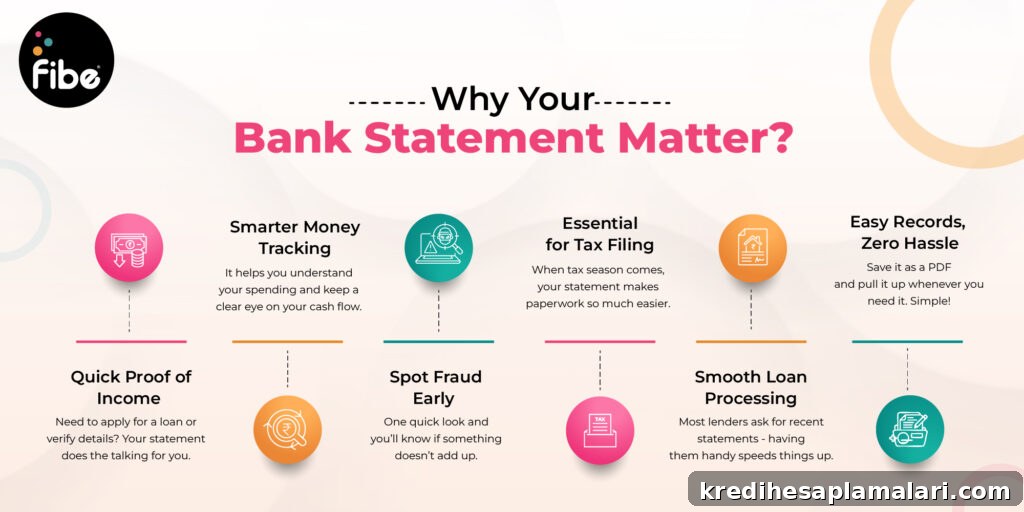
Lenders commonly request bank statements when you apply for loans, credit cards, or other financial products. A statement reveals income deposits, spending habits, recurring payments, and overall cash flow. Lenders use this information to assess financial stability and repayment capacity. For many loan applications, providing the last six months of your SBI bank statement is a standard requirement for underwriting and verification.
FAQs: Common Issues While Accessing SBI Bank Statements
How can I download my SBI bank statement online?
Use SBI Net Banking or the YONO mobile app to select an account and download the statement as a PDF.
Can I download my SBI bank statement without using Net Banking?
Yes. You can use the YONO app, request statements by email, visit a branch, or use ATM services for a mini statement.
How can I get my SBI mini statement through missed call banking?
Dial the SBI missed call number from the mobile number registered with your account; you will receive recent transactions via SMS.
How many transactions are shown in an SBI mini statement?
Typically the last five to ten transactions are shown in a mini statement.
What is the password for opening an SBI e-statement PDF?
The password is commonly based on personal details such as your date of birth or another account-specific format. If in doubt, refer to the instructions provided with the e-statement or contact SBI support.
Why can’t I download my SBI bank statement online?
Issues often arise from login problems, browser compatibility, network errors, or temporary server downtime. Try again later, use a different browser or device, or contact customer support if the problem persists.
Why won’t my downloaded SBI bank statement open?
Ensure you are entering the correct PDF password. If the password is correct and the file still won’t open, request the statement again or seek help from the bank.
Why is missed call banking or SMS not working for my mini statement?
Make sure the mobile number you use is registered and linked to your SBI account. If it is registered and the service still fails, contact the bank to verify service activation.











